Try -Catch in Java
- Keshari Abeysinghe

- Feb 28, 2020
- 2 min read
Try block
The try block contains set of statements where an exception can occur. A try block is always followed by a catch block, which handles the exception that occurs in associated try block. A try block must be followed by catch blocks or finally block or both.
Catch block
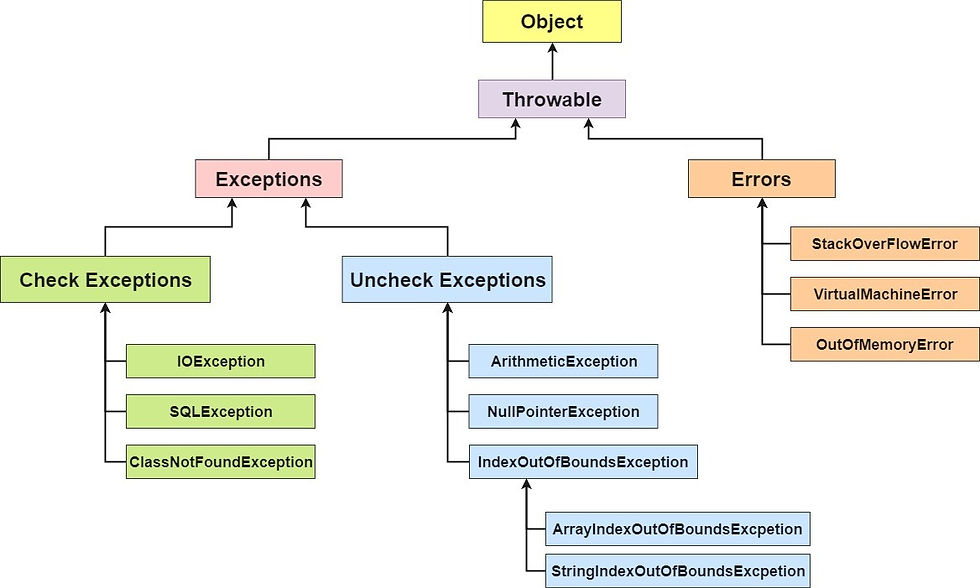
A catch block is where you handle the exceptions, this block must follow the try block. A single try block can have several catch blocks associated with it. You can catch different exceptions in different catch blocks. When an exception occurs in try block, the corresponding catch block that handles that particular exception executes. For example if an arithmetic exception occurs in try block then the statements enclosed in catch block for arithmetic exception executes.
The declared exception must be the parent class exception ( i.e., Exception) or the generated exception type. However, the good approach is to declare the generated type of exception.
Syntax for try-catch
try{
//code that may throw an exception
}
catch(Exception_class_Name ref){}
Here are some examples for use of try-catch for exception handling
Problem without Exception handling
public class Example1
{
    public static void main(String[] args) {
    int data=50/0; //may throw exception
    System.out.println("rest of the code");
    }
}
Excepted Output
Exception in thread "main" java.lang.ArithmeticException: / by zeroSolution with Try-Catch block
public class Example2
{
    public static void main(String[] args) {
    try{
    int data=50/0; //may throw exception
    }
    //handling the exception
    catch(ArithmeticException e)
    {
    System.out.println(e);
    }
    System.out.println("rest of the code");
    }
}
Expected Out put
java.lang.ArithmeticException: / by zero
rest of the code
Following example shows, the code kept in a try block that will not throw an exception.
public class Example3
{
  public static  void main(String[] args) {
  try
  {
  int data=50/0; //may throw exception
 // if exception occurs, the remaining statement will not exceute
  System.out.println("rest of the code");
  }
  // handling the exception
  catch(ArithmeticException e)
  {
  System.out.println(e);
  }
  }
}
Expected Output
java.lang.ArithmeticException: / by zeroFollowing example shows how handle the generated exception with a different type of exception class
public class Example4
{
  public static void main(String[] args) {
  try{
  int data=50/0; //may throw exception }
  /*try to handle the ArithmeticException using ArrayIndexOutOfBo
  *undsException*/
  catch(ArrayIndexOutOfBoundsException e)
  {System.out.println(e);
  }
 System.out.println("rest of the code");
  }
}
Expected Output
Exception in thread "main" java.lang.ArithmeticException: / by zeroLets see more on exception handling with upcoming posts.
Happy Coding!
Comments