Exception Handling
- Keshari Abeysinghe

- Feb 29, 2020
- 3 min read
What is an exception ?
Exception is an unwanted and unexpected error which occurs while running the normal flow of the programme . An exception can occur for many different reasons. Following are some scenarios where an exception occurs.
A user has entered an invalid data.
A file that needs to be opened cannot be found.
A network connection has been lost in the middle of communications or the JVM has run out of memory.
Some of these exceptions are caused by user error, others by programmer error, and others by physical resources that have failed in some manner.
Difference between Error and Exception
Error: An Error indicates a serious problem that a reasonable application should not try to catch.
Exception: Exception indicates conditions that a reasonable application might try to catch.
The java.lang. Throwable class is the root class of Java Exception hierarchy which is inherited by two subclasses : Exception and Error.
A hierarchy of Java Exception classes are given below:
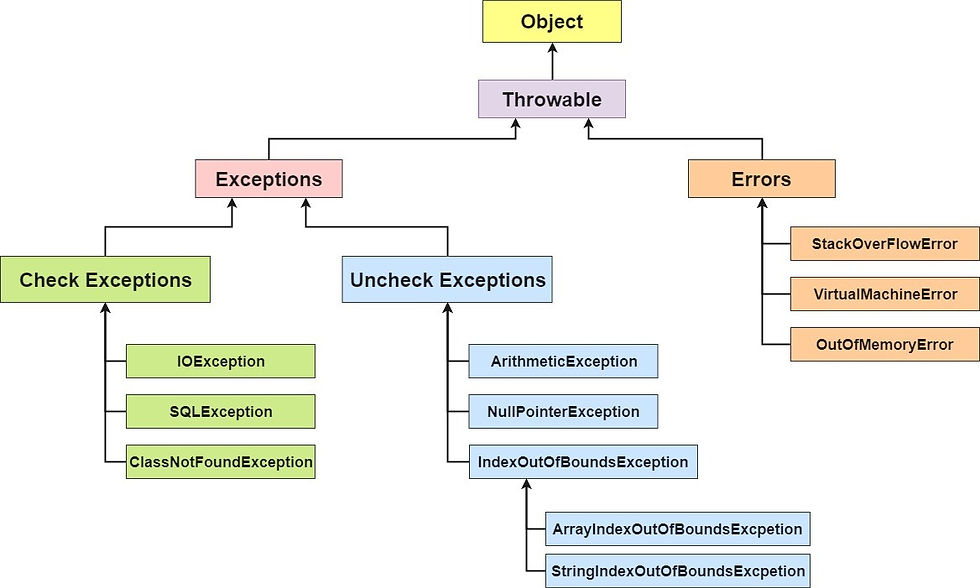
Types of java exceptions
According to the oracle we can categorize java exceptions in to 3 types.
1.unchecked exceptions
2.checked exceptions
3.errors
Checked Exceptions.
These are also called as compile time exceptions.
A checked exception is an exception that is notified by the compiler at compilation-time, These exceptions cannot simply be ignored, the programmer should take care of (handle) these exceptions.
e.g. IOException, SQLException etc.
Unchecked Exceptions
An unchecked exception is an exception that occurs at the time of execution. These are also called as Runtime Exceptions. These include programming bugs, such as logic errors or improper use of an API. Runtime exceptions are ignored at the time of compilation.
e.g. ArithmeticException, NullPointerException, ArrayIndexOutOfBoundsException etc.
Errors
These are not exceptions at all, but problems that arise beyond the control of the user or the programmer. Errors are typically ignored in your code because you can rarely do anything about an error. For example, if a stack overflow occurs, an error will arise. They are also ignored at the time of compilation.
Error is irrecoverable
e.g. OutOfMemoryError, VirtualMachineError, AssertionError etc
What is Exception Handling
Exception Handling is a mechanism to handle runtime errors such as ClassNotFoundException, IOException, SQLException, RemoteException, etc.
The core advantage of exception handling is to maintain the normal flow of the application.
Java exception handling is managed via five keywords: try, catch, throw, throws and finally.
Try -"try" keyword is used to specify a block where we should place exception code. The try block must be followed by either catch or finally. It means, we can't use try block alone.
Catch - "catch" block is used to handle the exception. It must be preceded by try block which means we can't use catch block alone. It can be followed by finally block later.
Finally- "finally" block is used to execute the important code of the program. It is executed whether an exception is handled or not.
Throw- "throw" keyword is used to throw an exception.
Thorws -The "throws" keyword is used to declare exceptions. It doesn't throw an exception. It specifies that there may occur an exception in the method. It is always used with method signatures.
Exceptions Methods
Following is the list of important methods available in the Throwable class.
public String getMessage() Returns a detailed message about the exception that has occurred. This message is initialized in the Throwable constructor.
public Throwable getCause() Returns the cause of the exception as represented by a Throwable object.
public String toString() Returns the name of the class concatenated with the result of getMessage().
public void printStackTrace() Prints the result of toString() along with the stack trace to System.err, the error output stream.
public StackTraceElement [] getStackTrace() Returns an array containing each element on the stack trace. The element at index 0 represents the top of the call stack, and the last element in the array represents the method at the bottom of the call stack.
public Throwable fillInStackTrace() Fills the stack trace of this Throwable object with the current stack trace, adding to any previous information in the stack trace.
Examples for try-catch
public class Exceptionhandling
{
    public static void main(Strings args[]){
    try {
    int data=5/0; //may throw exception
    }

    catch(ArithmeticException e){
    System.out.println(e);
    }
    System.out.println("rest of the code");
    }
}
Expected output:
java.lang.ArithmeticException: / by zero
rest of the code
The JVM firstly checks whether the exception is handled or not. If exception is not handled, JVM provides a default exception handler that performs the following tasks:
Prints out exception description.
Prints the stack trace (Hierarchy of methods where the exception occurred).
Causes the program to terminate.
But if exception is handled by the application programmer, normal flow of the application is maintained i.e. rest of the code is executed.
Its brief introduction about exception handling in Java.
Follow next articles for your completion.
Happy Coding !
Comments